I tested 21 Claude Cowork plugins. Here is an honest list of the most useful ones and how you can use them.
Claude Cowork plugins, feature overview, Data Analysis, Productivity, Sales, Legal, Marketing, business process improvement, task automation

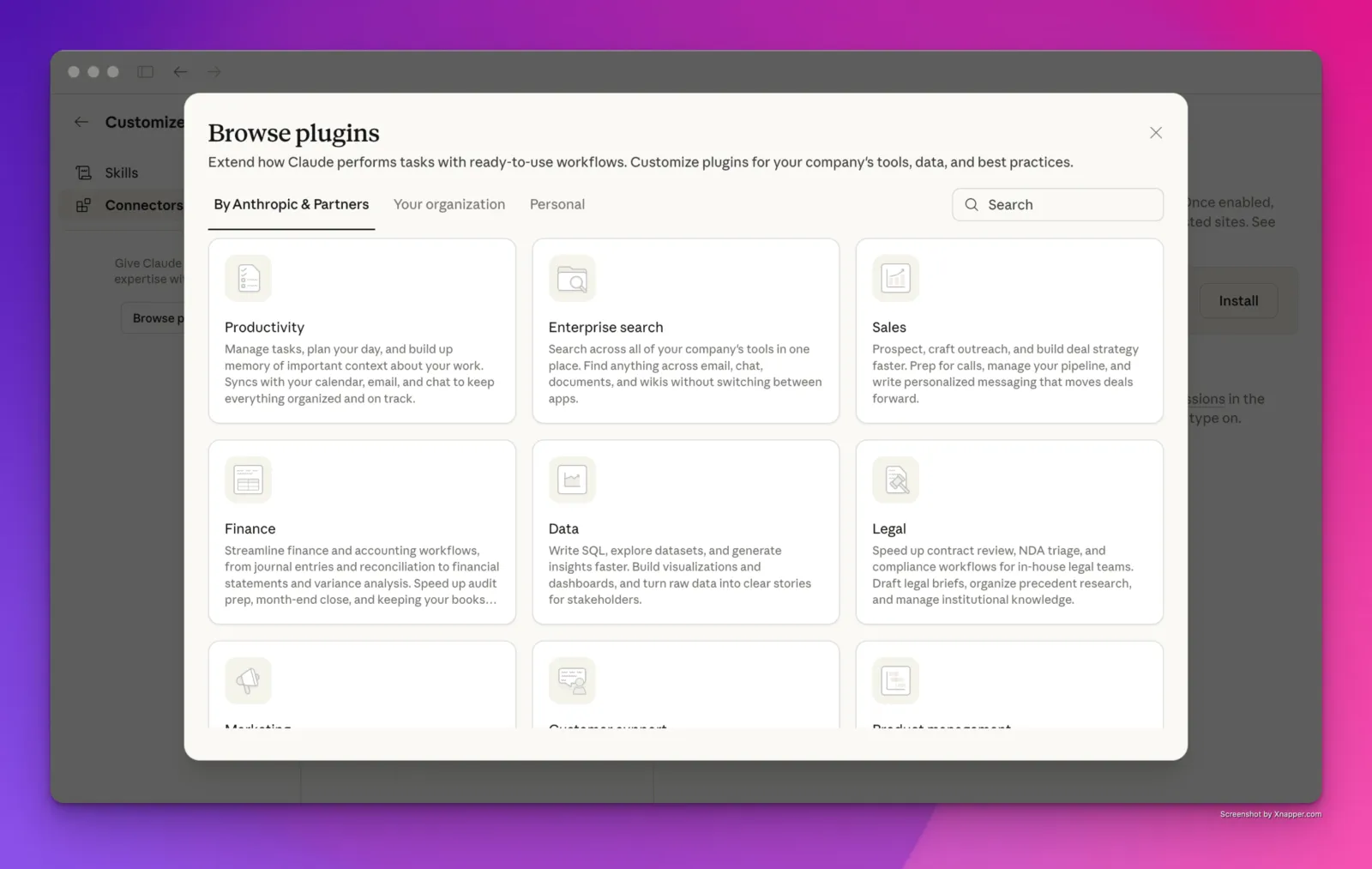
Anthropic recently released plugins for Claude Cowork, and in the time since, the public software market has experienced one of its most nerve-wracking weeks in years. Below is my honest breakdown after four weeks of daily use.
What are plugins, really?
The biggest misconception is that a plugin is just an improved prompt. In practice, it is a packaged role.
Each plugin contains domain expertise, structured instructions, MCP integrations, and the ability to launch sub-agents for parallel tasks. For example, when you install , you don't just get an email template; you load the model with call preparation logic, an understanding of deal stages, and rules for handling objections.
The difference is felt almost immediately. A standard prompt gives you neat text. A plugin gives you a process. However, not all processes are equally well-developed.
Data Analysis
The strongest plugin of them all. You upload a CSV and run:
/data:exploreClaude doesn't just summarize columns; it attempts to understand the business structure in numbers, finds anomalies, checks data quality, and suggests directions for analysis. From there, you formulate tasks in plain language, and it writes SQL, explains the query logic, and—when connected to Snowflake or BigQuery—executes it on live data.
In one project with 45,000 rows, it discovered a pricing anomaly in an average rate that was costing the company about 14,000 dollars per month. The important part wasn't just that it wrote the query, but that it proposed a hypothesis the team hadn't even considered. For people who work with data but don't want to write code every day, this is already a full-fledged professional tool.
Productivity
This isn't the most flashy, but it is the stickiest plugin.
It connects to task managers, calendars, and messengers, and begins working like an operational assistant. After a week of use, Claude already understands which tasks are critical for you, which meetings are high priority, and where you are systematically overloading your day.
/productivity:startThis changes your daily rhythm. You get the feeling that someone has pre-organized the chaos into neat folders.
Sales
This plugin drastically reduces meeting preparation time.
The preparation workflow pulls data from the CRM, analyzes the company, gathers news, and forms an agenda and potential objections.
One sales executive I shared my experience with reduced their call prep from an hour and a half to ten minutes. And that is no exaggeration.
Legal
This is exactly the plugin that caused the panic.
It automates a significant portion of routine legal work: initial contract review, NDAs, compliance checklists, and drafting. It doesn't replace lawyers, but it takes over the layer of tasks previously handled by junior staff.
Without configuration to match internal standards and acceptable risk levels, the results remain too generic. Once customized, the effect becomes much more powerful.
Product Management
The plugin turns a vague idea into a structured document complete with use cases, acceptance criteria, and dependencies. It asks clarifying questions before writing a specification, which makes the output significantly higher quality than standard AI text.
The synchronization with backlogs and feedback is particularly useful, as it generates a roadmap based on real context rather than abstract priorities.
Marketing
The key advantage here is maintaining brand voice. If you have a defined brand book and communication strategy, your content begins to sound cohesive. The plugin helps build campaigns across multiple channels simultaneously and tie them to specific metrics.
It doesn't replace strategy, but it significantly accelerates the operational side.
Finance
Financial plugins arrived in a separate wave. The integration between Excel and PowerPoint is especially interesting, where the model analyzes a spreadsheet and automatically generates a presentation for a board of directors or investors.
Anthropic's collaboration with major consulting firms in this area hints that the focus is on the enterprise segment.
A good foundation, but context is needed
This category includes Customer Support, HR, Engineering, Operations, Design, and specialized financial plugins like Investment Banking, Equity Research, and Private Equity.
All of them provide a high-quality work structure. The problem is that out of the box, they are too universal. To make them truly powerful, you need to upload internal documents, regulations, templates, evaluation criteria, and communication standards. Without this, they function merely as neat but generic frameworks.
What didn't work so well?
Enterprise Search, Bio Research, and Wealth Management look conceptually interesting but are too dependent on connected sources and the quality of internal data. If your corporate documentation is chaotic, the plugin will simply reflect that chaos faster.
What is actually happening?
Looking at the bigger picture, the first wave of plugins covered the basic functions of any company: sales, marketing, finance, legal, data. The second wave has gone deeper, addressing specific roles and industries.
What should you do right now if you have Claude Cowork?
Open Cowork and install Data Analysis, Productivity, and Sales. Then, choose a plugin for your specific role and spend half an hour configuring skills to match your company's context. After that, you should start measuring one metric: the time from task appearance to finished result.
If you are interested in AI, technology, and the future—welcome to my channel to discuss and share updates.
Translated from Russian. Original on vc.ru: Я протестировал 21 плагин Claude Cowork. Вот честный список самых полезных плагинов и то, как можно их использовать.